
cop:londonmaps
Differences
This shows you the differences between two versions of the page.
| Both sides previous revision Previous revision Next revision | Previous revision | ||
|
cop:londonmaps [2018/05/21 12:37] davidwilcox [Background] |
cop:londonmaps [2021/02/01 16:22] (current) davidwilcox |
||
|---|---|---|---|
| Line 1: | Line 1: | ||
| - | #Collaboration maps for London | + | #A first map of mappers and network builders |
| Drew Mackie and David Wilcox May 2018 | Drew Mackie and David Wilcox May 2018 | ||
| - | ##Background | + | * [Full version of this paper here](https://docs.google.com/document/d/1w6Rc0dH_Zh_4NDMdZroz0l0d9_G-1YIhrcZYQQCnI8E/edit#) |
| - | Over the past 18 months [[london:exploration|we have explored]] how to help people use maps, apps and storytelling to build more inclusive communities and stronger civic networks. There's now scope to do lots more by piloting collaboration maps and developing a Community of Practice: | + | //We are building a map of people and organisations interested in using different types of maps to identify local assets, connect communities, and build networks, particularly in London. Our aim is to develop and support a network, and communities of practice, that will contribute to making a London a more networked city. [[cop:copindex|More here]].// |
| - | * creating social spaces for learning and developing collaborative projects online and at events. | + | Before and during a Networked City event at Newspeak House on March 27 2018 Drew Mackie and David Wilcox invited those attending, and others interested, to contribute their profiles and connections to a map, using the front-end [Sumapp survey tool](http://greaterthanthesum.com/sumapp/), and [Kumu](https://kumu.io) mapping software. |
| - | * bringing together specialists in mapping, data, civic technology and storytelling, with activists from London communities and networks | + | |
| - | * demonstrating how collaborative maps, supported by other methods, can underpin community development and network building. | + | |
| - | * building maps and communication systems to underpin this work and make London a Networked City | + | |
| - | ##Community of Practice | + | * [[networks:netmaps|More in this article on how to build network maps]] |
| - | + | ||
| - | During the exploration we developed the idea of a Community of Practice (CoP), through which people could learn from each other and also find opportunities to collaborate on projects. The CoP could support and expand the work of the Networks Partner role recently advertised by the Hub for London. The responsibilities for the role amount to a highly ambitious programme for network building and communication systems development that is likely to be beyond the capacity of one person. | + | |
| - | + | ||
| - | * [[cop:copindex|More About the Community of Practice]] | + | |
| - | * [[hub:networkspartner|The Networks Partner role]] | + | |
| - | + | ||
| - | ##A first map of mappers and network builders | + | |
| - | + | ||
| - | * [Full version of this paper here](https://docs.google.com/document/d/1w6Rc0dH_Zh_4NDMdZroz0l0d9_G-1YIhrcZYQQCnI8E/edit#) | + | |
| - | + | ||
| - | Before and during a Networked City event at Newspeak House on March 27 2018 Drew Mackie and David Wilcox invited those attending, and others interested, to contribute their profiles and connections to a map, using the front-end [Sumapp survey tool](http://greaterthanthesum.com/sumapp/), and [Kumu](https://kumu.io) mapping software. | + | |
| The results shown here come from the 141 questionnaires issued the week before the Newspeak House event, a further set of 10 invitations sent out at another event to people who expressed interest and two further requests since then. | The results shown here come from the 141 questionnaires issued the week before the Newspeak House event, a further set of 10 invitations sent out at another event to people who expressed interest and two further requests since then. | ||
| Line 43: | Line 29: | ||
| Some respondents suggested that further contacts NOT on the questionnaire’s ‘card set’ should be invited. As the survey progresses we will invite these and add them to the map. | Some respondents suggested that further contacts NOT on the questionnaire’s ‘card set’ should be invited. As the survey progresses we will invite these and add them to the map. | ||
| - | + | {{:cop:lonmap.jpg|}} | |
| - | 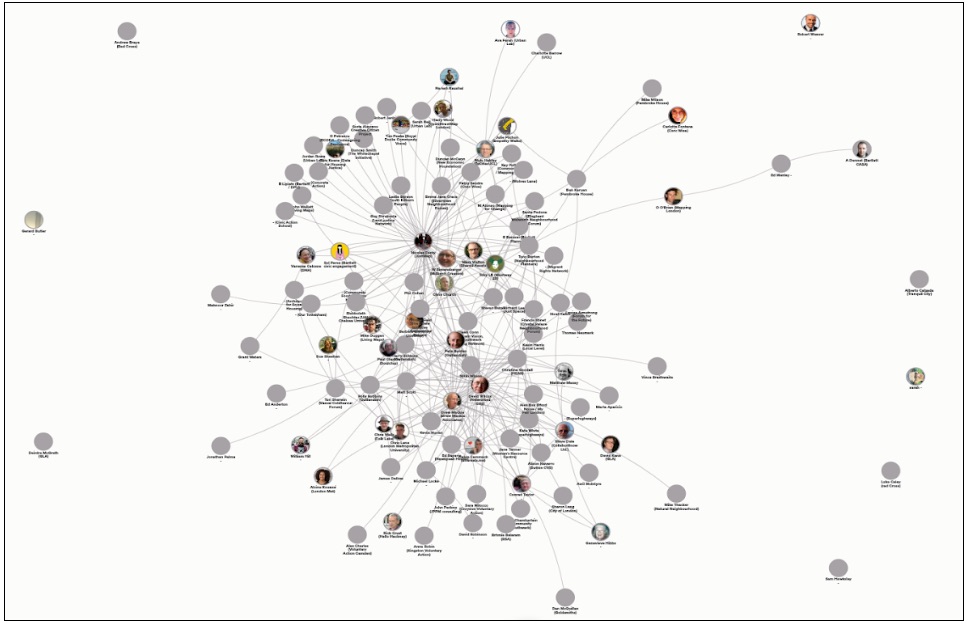 | + | |
| Note that the configuration of the map will change as new nodes and connections are added. | Note that the configuration of the map will change as new nodes and connections are added. | ||
| Line 54: | Line 39: | ||
| * How nodes share attributes | * How nodes share attributes | ||
| - |  | + | {{:cop:lonmap5.jpg|}} |
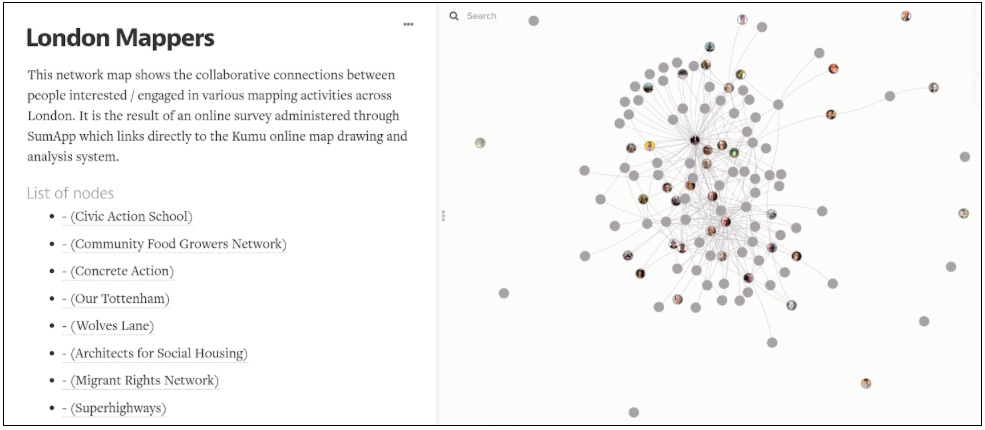
| The map opening screen above shows a sidebar with a brief description and a list of nodes which has been generated by the software. Clicking on a title will take you to that node on the map and highlight it. The map itself shows the nodes of respondents and the connections they have cited in the questionnaire. Some nodes have images that have been added in the questionnaire or are attached by ‘gravatar’ to the node’s email address. The circle of outlying nodes is largely composed of respondents who have not specified any connections and have not been cited by other nodes. | The map opening screen above shows a sidebar with a brief description and a list of nodes which has been generated by the software. Clicking on a title will take you to that node on the map and highlight it. The map itself shows the nodes of respondents and the connections they have cited in the questionnaire. Some nodes have images that have been added in the questionnaire or are attached by ‘gravatar’ to the node’s email address. The circle of outlying nodes is largely composed of respondents who have not specified any connections and have not been cited by other nodes. | ||
| - |  | + | {{:cop:lonmap4.jpg|}} |
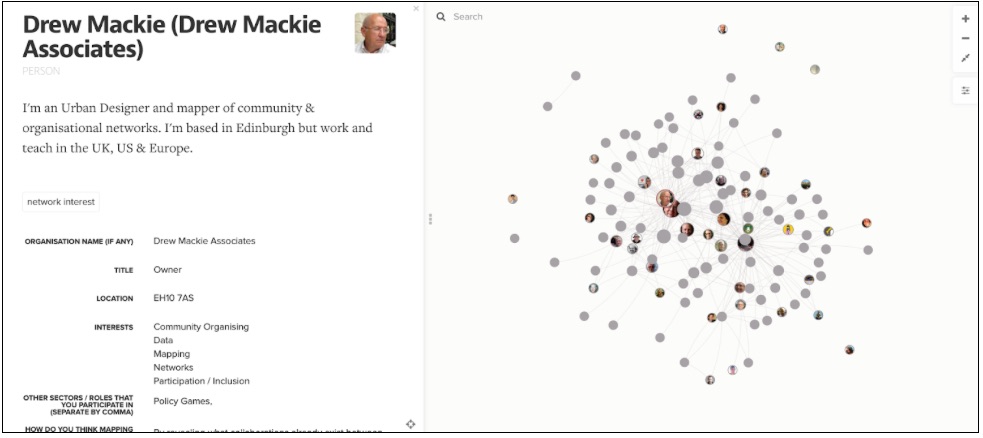
| The screen above shows an individual highlighted node with its scrolling descriptive sidebar. | The screen above shows an individual highlighted node with its scrolling descriptive sidebar. | ||
| Line 70: | Line 55: | ||
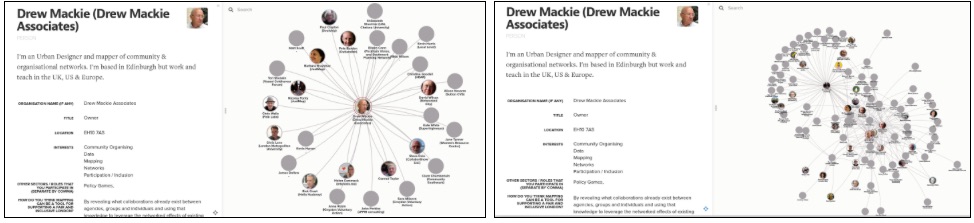
| * Highlight a node and press ‘1’ on the keyboard to show only the immediate connections to that node. Pressing ‘2’ will show all nodes that are two connections away from that node and so on. This useful in exploring the network environment of nodes. | * Highlight a node and press ‘1’ on the keyboard to show only the immediate connections to that node. Pressing ‘2’ will show all nodes that are two connections away from that node and so on. This useful in exploring the network environment of nodes. | ||
| - |  | + | {{:cop:lonmap3.jpg|}} |
| The screen above left shows an individual node and its immediate connections. The screen above right shows the same node and the nodes within 2 connection ‘steps’. This is really useful in exploring the new collaborations that you might initiate between: | The screen above left shows an individual node and its immediate connections. The screen above right shows the same node and the nodes within 2 connection ‘steps’. This is really useful in exploring the new collaborations that you might initiate between: | ||
| Line 85: | Line 70: | ||
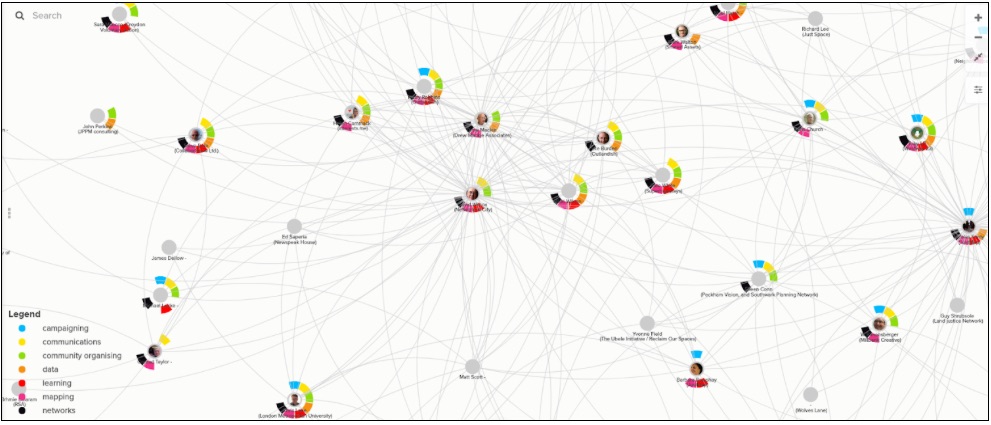
| The survey also asked people to identify their needs and offers. We can search and isolate nodes that need certain assets and colour them. We can search and isolate those that offer assets that meet those needs and identify where there are existing collaborations and where we could encourage new collaborations. As in the map below we can color code a version of the map to show wants and offers. Each node with a halo of coloured indicators shows its mix of interests as described in the legend at the bottom left. | The survey also asked people to identify their needs and offers. We can search and isolate nodes that need certain assets and colour them. We can search and isolate those that offer assets that meet those needs and identify where there are existing collaborations and where we could encourage new collaborations. As in the map below we can color code a version of the map to show wants and offers. Each node with a halo of coloured indicators shows its mix of interests as described in the legend at the bottom left. | ||
| - |  | + | {{:cop:lonmap2.jpg|}} |
| ###Centrality | ###Centrality | ||
| Line 93: | Line 78: | ||
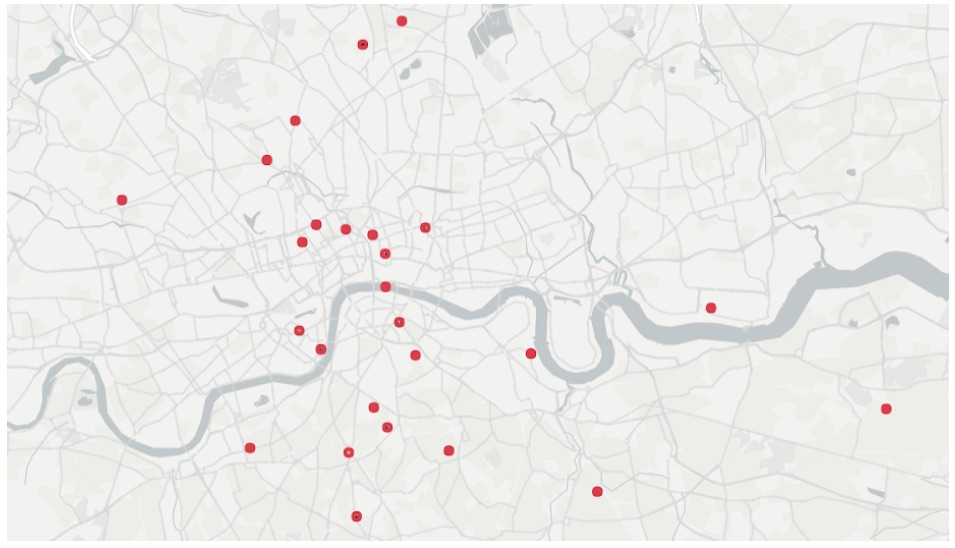
| It is possible to show the map nodes on a geomap created in OpenStreetmap. Kumu will automatically locate nodes based on postcode. The map below is created in Kumu through the recording of postcodes in the questionnaire. We have not shown the connections in this example as this can often be visually confusing. Clicking on any node will bring up the sidebar with its information. | It is possible to show the map nodes on a geomap created in OpenStreetmap. Kumu will automatically locate nodes based on postcode. The map below is created in Kumu through the recording of postcodes in the questionnaire. We have not shown the connections in this example as this can often be visually confusing. Clicking on any node will bring up the sidebar with its information. | ||
| - |  | + | {{:cop:lonmap1.jpg|}} |
cop/londonmaps.1526906231.txt.gz · Last modified: 2018/05/21 12:37 by davidwilcox
Page Tools
Except where otherwise noted, content on this wiki is licensed under the following license: CC Attribution-Noncommercial-Share Alike 4.0 International


